
AXIUM HD L27 - Television SAGEM - Free user manual and instructions
Find the device manual for free AXIUM HD L27 SAGEM in PDF.


| Product Type | LED TV |
| Brand | SAGEM |
| Model | AXIUM HD L27 |
| Screen Size | 27 inches (68.6 cm) |
| Resolution | 1366 x 768 pixels (HD Ready) |
| Screen Format | 16:9 |
| Dimensions with stand | 65 x 42 x 18 cm |
| Weight with stand | 6.5 kg |
| Power Supply | 220-240 V, 50-60 Hz |
| Power Consumption | 65 W (standby < 1 W) |
| Connectivity | 2x HDMI, 1x USB, 1x SCART, 1x antenna input |
| Speakers | 2 x 8 W |
| Tuner | Built-in DVB-T tuner |
| Functions | Teletext, parental control, timer |
| Cleaning | Dry soft cloth, avoid solvents |
| Safety | Do not open the housing, unplug before cleaning |
| Repairability | Parts available through certified service center |
| Wall mounting | VESA standard 100x100 mm |
| Operating temperature | 5°C to 40°C |
Frequently Asked Questions - AXIUM HD L27 SAGEM
User questions about AXIUM HD L27 SAGEM
0 question about this device. Answer the ones you know or ask your own.
Ask a new question about this device
Download the instructions for your Television in PDF format for free! Find your manual AXIUM HD L27 - SAGEM and take your electronic device back in hand. On this page are published all the documents necessary for the use of your device. AXIUM HD L27 by SAGEM.
USER MANUAL AXIUM HD L27 SAGEM
Respect all maintenance advice, safety precautions and safety and to prolong the working life of the equipment.
- Definitions
- Caution
The exclamation mark within a triangle is i vicing instructions.
WARNING The lightning flash with an arrowhead with
Safety regulations
This LCD TV is a class 1 appliance, with an earth.
This LCD TV is designed to function:
at an ambient temperature between +5^ and +35^ , in areas with humidity less than 85% .
This LCD TV uses high voltages. Never attempt to access the interior of the device. Only suitably qualified persons are authorised to do this.
Only suitably qualified persons are authorised to do this. Do not open or dismantle this product, as this will expose you to risk of electrocution
Only suitably qualified persons are at Do not open or dismantle this product
! Damage: Never use your TV if it is damaged in bare hands. Always place your TV or vibrations.
bare hands. Always place your TV or vibrations.
Weather:
Weather: It is advisable to unplug the power sul
Moisture: Do not allow your TV to be exposed.
Do not allow your car to be impeded can cause serious damage. If you sp ly. Contact your store.
Interference:
Do not place your TV on or near app do, it may adversely affect the workir
Do not place your TV on or near app do, it may adversely affect the work
Temperature: Avoid extremes of temperature, either
Avoid extremes of temperature, either as radiators or gas/electric fire.
The TV must be well ventilated. Do recommended that you leave a 10cm
Covers: Do not remove any fixed covers as th
Standby: Do not leave your TV in standby for long periods of time e.g. while on holiday.
2. Overview of the LCD TV
Paaeees: Paeess
eennnne nnnnne ennnnne eannnnnne aen annnne ane ane ane ane ane ane ane ane ane ane ane ane ane ane ane ane ane ane ane ane ane
aen ene ane ane ane ane ane ane ane ane ane ane ane ane ane ane ane ane ane ane ane ane ane ane ane ane ane ane ane ane ane ane ane ane ane ane ane ane ane ane ane ane ane ane ane ane ane ane ane ane ane ane
Screen Burn
Only use suitable batteries that comply with the maker's specifications (see $ 2.2)
- pay particular attention to environmental matters;
Nere use Benzene alcohol or petroleum-based cleaning products as these could damage the finish!
2.2. Inserting the remote control batteries
Pull the latch on the battery compartment, cover the rear of the remote control and remove the cover.
Insert the two supplied bathees. Check the + and - enus- tings of the batteries before ines- ing them in the compartment
-
-
-
Remove the batteries to avoid damage from possible battery leakage if you anticipate that the remote
I h t i t t t t t t t t t t t t t t t t t t t t t t t t t t t t t t t t t t t t t t t t t t t t t t t t t t
23. Connecting power
- Connect the oneh end or the power cord to an earim power outet
rsterstation
3. First installation

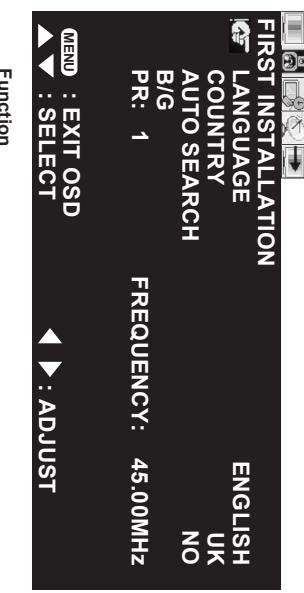
Function
ANGIAGE
LAN GUAGE
0
CUNNNTY
AITO SEARCH
3.1: Product functions
The following section describes the various functions of the LCD TV. Please take a few moments to get used to
FronView

1
P
P
+
C
s card s lot
SM card slot
Insert an SM card in this slot:
(1)
(6)
ENGLISH
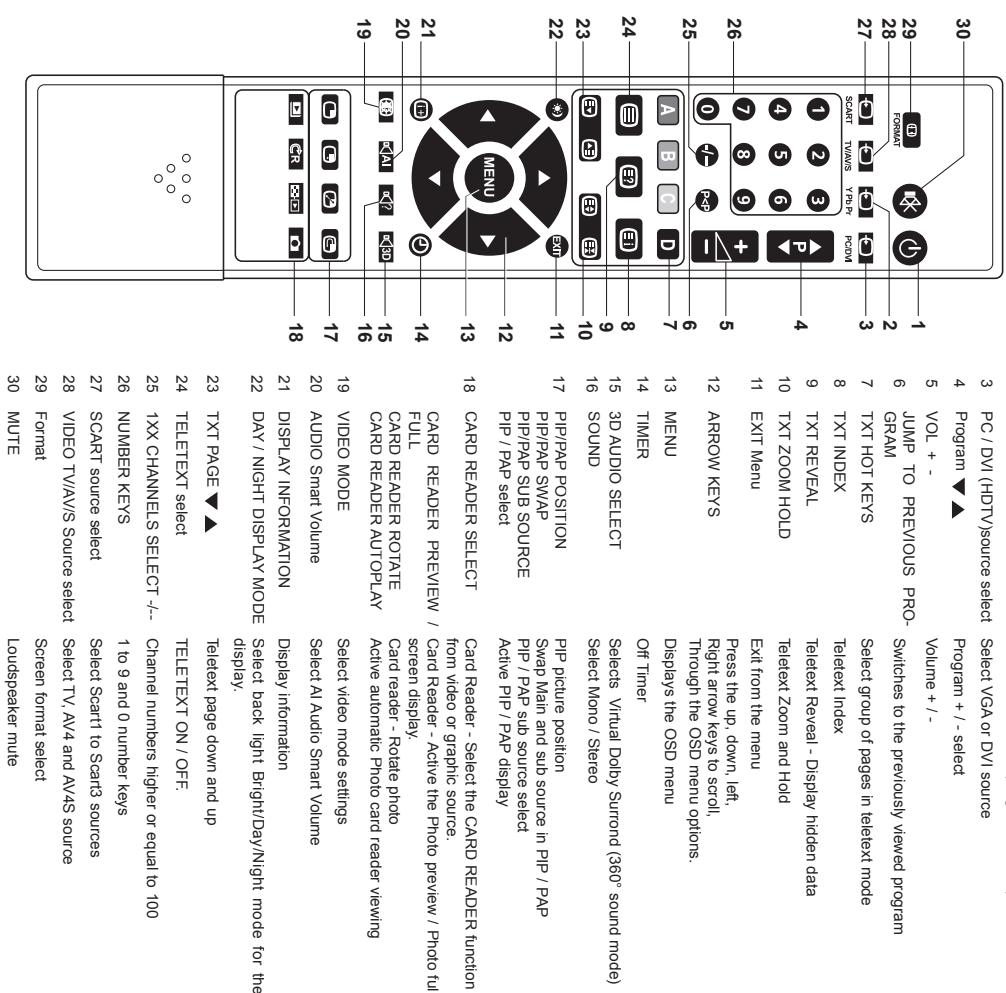
4. Remote control
5. Getting started
Please refer to the following sections for detailed instructions about connecting the audio/video (AV) device of your choice to your LCD TV and view your favorite programs or movies. These sections describe the procedure required to set up your TV for easy and convenient viewing.
Basic connections
The SAGEM AXIUM™ HD-L27 LCD Television provides multiple input and output ports to enable you to connect different types of A/V devices such as an antenna or cable TV line, a VCR /DVD player, cable or satellite Set Top Boxes (HDTV compliant), or even a PC (HDTV compliant).
You can also use the LCD TV as a flash memory card reader and view your digital photographs directly on the TV without requiring a PC connection.
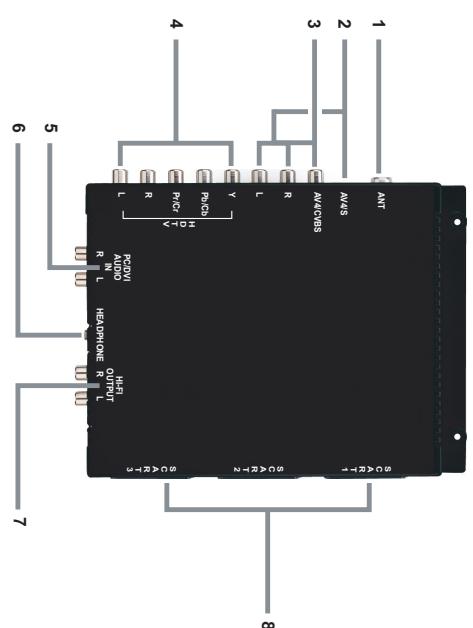
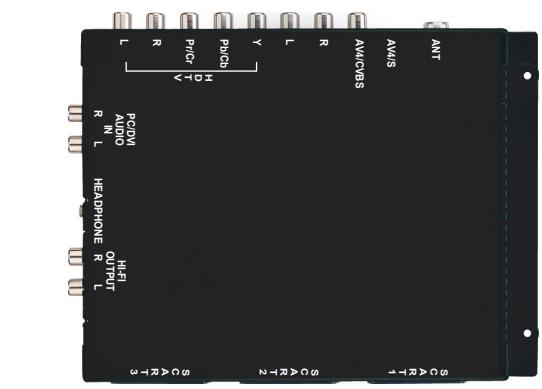
The back panel of the LCD TV provides input and output connectors to make these connections possible. The following sections discuss the various ports and the type of A/V devices that can be connected to your TV.
If sunlight shines directly on the remote sensor, the operation of the remote control may become unstable, and the effective range will be shorter. Do not hit or violently shake the remote control. Never expose the remote control to high temperature or humidity. If the remote control is not used for an extended period of time, remove the batteries to prevent damage or injury from possible battery leakage.
- Refer to these notes before connecting any audio/video equipment to this TV.
- Refer to the manuals of your stereo amplifier, or other equipment as necessary.
- Disconnect all equipment from the power outlets. Connect the equipment to the power outlets only after you have completed connecting everything. Never make or change connections with equipment connected to a power outlet.
- Connect a DVD player directly to the TV. For example, do not connect a DVD player to a VCR, and then connect the VCR to your TV. This type of connection could distort both the picture and the sound. Your VCR might also have a copy protection system, which could result in a distorted DVD image.
- Set the stereo system to the correct source if your LCD TV is also connected to a stereo system.
- You only need one audio connection and one video connection between your TV and other audio/video equipment (e.g. DVD player, VCR, Camcorder). This means that you may not use all the connectors on the TV for a basic installation.
- If you plan to watch TV with VCR off, connect a coaxial cable to the VCR's TUNER IN connector and to the ANT connector on your LCD TV. This allows you to watch channels on the TV normally when the VCR is off.
- The existing connection possibilities determine the picture quality (decreasingly from top level to lowest quality: Progressive Scan Component Video, Interlaced Component Video, RGB Scart, S-Video and Composite Video). The selection of your video support should be carefully examined according to the expected quality.
Tn nnnnne aen ane enanee eannnne aeennnne
connneonone a 75x coaxal cable to the AN1 conner on the rear
2 1
Ae aee eae ee eae eae eae eae eae eae eae eae eae eae eae eae eae eae eae eae eae eae eae eae eae eae eae eae eae eae eae eae eae eae eae eae eae eae eae eae eae eae eae eae eae eae eae eae eae eae eae eae eae eae eee
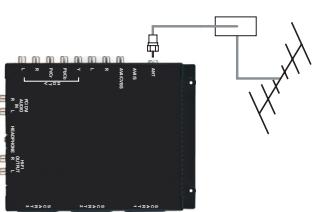
·
5.1.2. COMPONENT port
P 1000000000000000000000000000000000000000000000000000000000000000000000000
Aeae aee eae aeae eeae aeae aeae aeae aeae aeae aeae aeae aeae aeae aeae aeae aeae aeae aeae aeae aeae aeae aeae aeae aeae aeae aeae aeae aeae aeae aeae aeae aeae aeae aeae aeae aeae aeae aeae aeae aeae aeae aeae aeae aeae aeae aeae aeae aeae aeae aeae aeae aeae aeae aeae aaee
2 1 2
5.1.3. SCART ports The LCD TV has three ports for connecting up to three SCART AV devices with the LCD TV
T 1
rnnnne nnnnne nnnnne nnnnne nnnnne nnnnne nnnnne nnnnne nnnnne nnnnne nnnnne nnnnne nnnnne nnnnne nnnnne nnnnne nnnnne nnnnne nnnnne nnnnne nnnnne nnnnne nnnnne nnnnne nnnnne nnnnne
rerrrrrnnnne rnrnnnne nnnnne eannnnnne
CORS
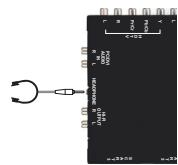
51.7. HEADPHONE port
The HEADPHONE port allows you to connect headphones to your LCD TV.
5.1.5 AV4 input
aee aee eae ee eae eae eae eae eae eae eae eae eae eae eae eae eae eae eae eae eae eae eae eae eae eae eae eae eae eae eae eae eae eae eae eae eae eae eae eae eae eae eae eae eae eae eae eae eae eae eae eae eae eae e ae
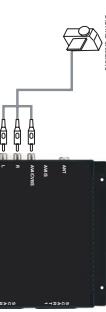
N
1 + u1 - 1 = ( 1 + u) u1 < 1 = u
5.16. MULTIMEDIA PORT
or for your PC. To connect to a PC/Laptop, do the following:
Connect the DVD or PC lapod or HDTV Settop Box to the Dv port, or
mnnnne nnnnne
aannnnnne aannnnnne nnnnne annnnnne ane annnnnne eannnnnne
The AV45 port has been so this port to enable you to connect device with S-vidoc output be ccted as Dpans digital cameras are also available
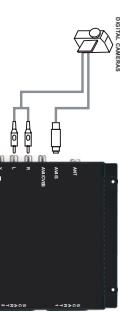
2 Using an audio cable, connect the audio (L) AV connector on the IV to the
As the following show
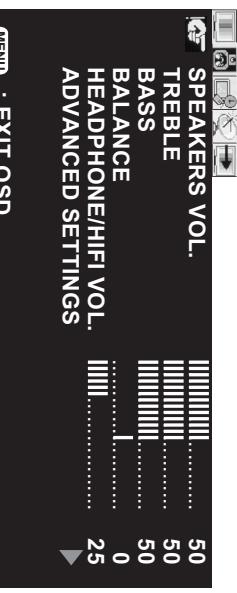
7.3.1. Advanced settings
ADVANCED SETTINGS
HAEH HHEE HIEF VOT
BAA
BASS
TRENT
0
C
a aae eaae aee aee aee aee
7.3. Changing audio settings
7.2: Changing PC settings
Anglais LU 27 A5.qxd 15/12/2004 10:08 Page 13
rrnne aenrnnn ennnn nnnn eannn nee
Channne eae
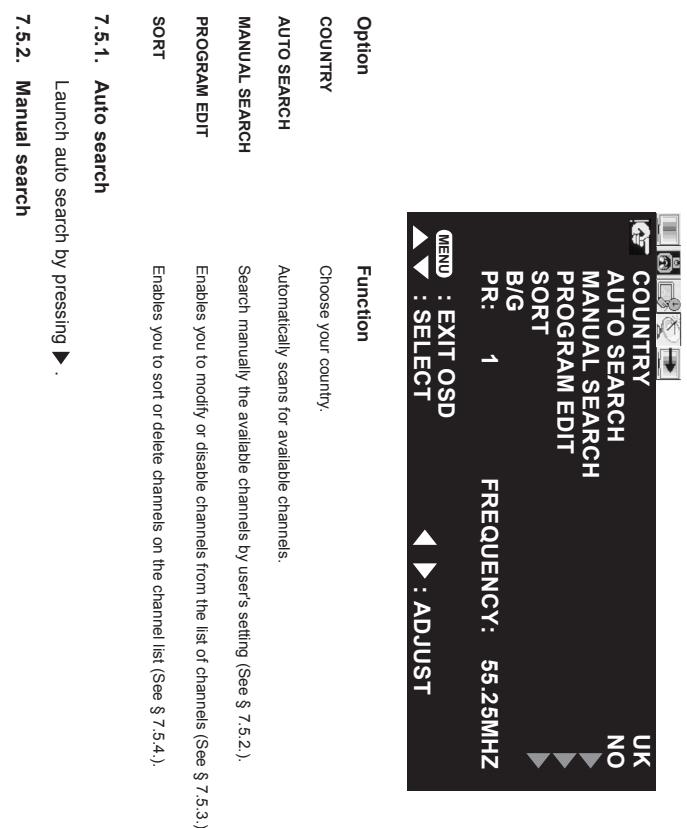
7.5 Channel search
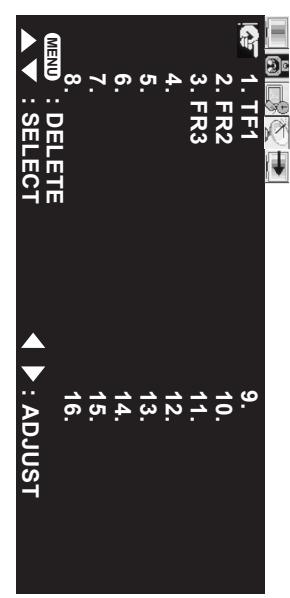
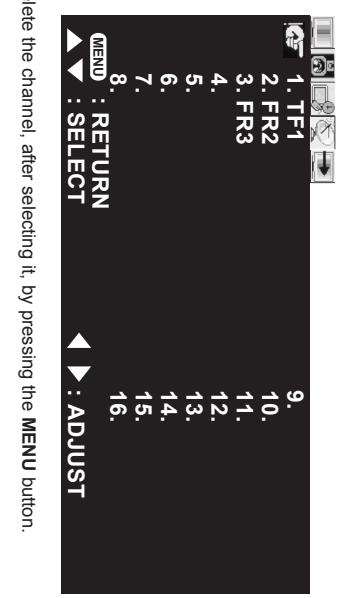
Valiicate with
Select a channel in the list with Move this channel with
7.5.4. Sort
e e
vence, choose the MIDDLE-LOW and HIGH duration. This can decrease the soreness of the pain caused because of the
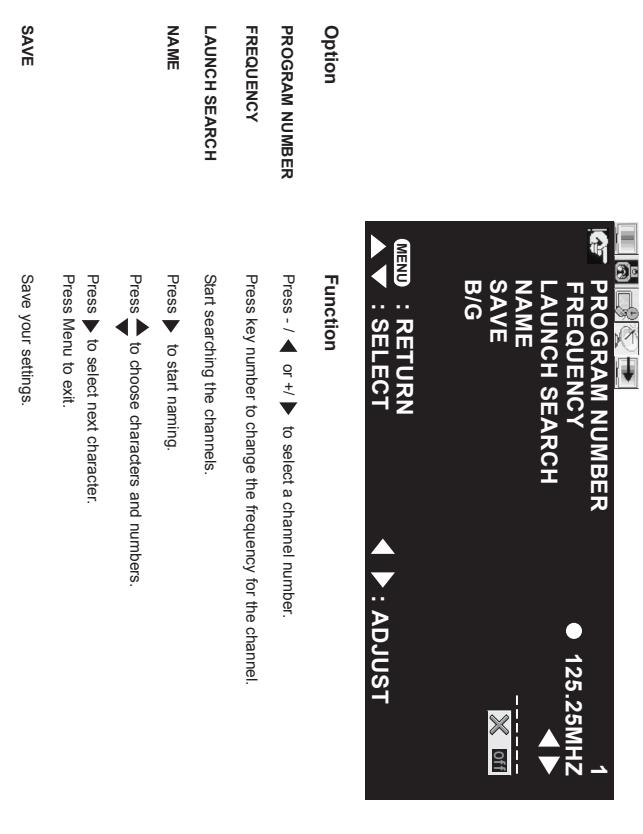
Press - ▲ or +□ to select a channel number.
Function
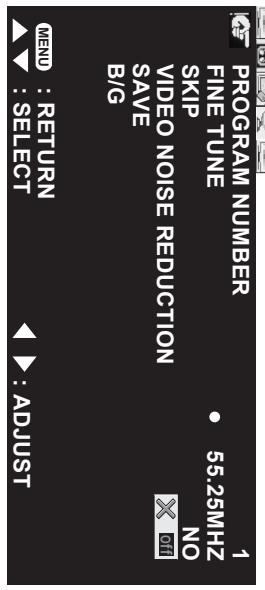
7.5.3. Program edit

Function
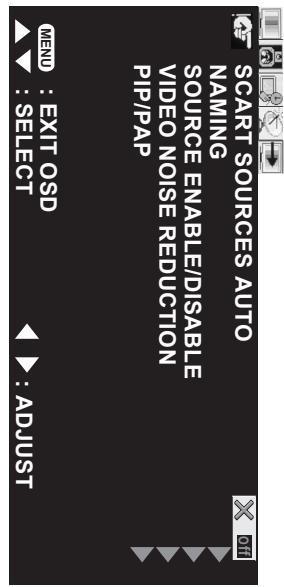
Function
When the position is on, the LCD TV wake up is driven by the AV device connected to one of the SCART
ENGLISH
e e e e e e e e e e e e e e e e e e e e e e e e e e e e e e e e
e e e e e e e e e e e e e e e e e e e e e e
e e e e e e e e e e e e e e e e e e e
8
L L S S Eepeeppeeppeeppeeppeeppeeppeeppeeppeeppeeppeeppeeppeeppeeppeeppeeppeeppeeppeeppeeppeeppeeppeeppeeppeeppeeppeeppeeppeeppeeppeeppeeppeeppeeppeeppeeppeeppeeppeeppeeppeeppeeppeeppe
e e e e e e e e e e e e e e e e e e e e e e e e e
eepn eepn eepn eepn eepn eepn eepn eepn eepn eepn eepn eepn eepn eepn eepn eepn eepn eepn eepn eepn eepn eepn eepn eepn eepn eepn eepn eepn eepn eepn eepn eepn eepn eepn ecpnn nnnnnnnnnnnnnnnnnnnnnnnnnnnnnnnnnnnnnnnnnnnnnnnnnnnnnnnnnnnnnnnnnnnnnnnnnnnnnnnnnnnnnnnnnnnnnnnnnnnnnnnnnnnnnnnnnnnnnnnnnnnnnnn
e e
e e
e e e e e e e e e e e e e e e e e e e e e e
Ae eae ee eae ee eae ee eae ee eae ee eae ee eae ee eae ee eae ee eae ee eae ee eae ee eae ee eae ee eae ee eae ee eae ee eae ee eae ee eae ee eae ee eae ee eae ee eae ee eae ee eae ee eae ee eae ee eae ee eae ee eae ee eae ee eae ee eae ee
e e e e e e e e e e e e e e e e e e e e
e e e e e e e e e e e e e e e e e e e e e e e e e e e
(1)
L
P 1000000000000000000000000000000000000000000000000000000000000000000000000000000000
e e e e e e e e e e e e e e e e e e e
Pnne nnnnne nee eae ene eee eee
-
Aeppnss s
eessssssssssssssssssssssssssssssssssssssssssssssssssssssssssssssssssssssssssssssssssssssssssssssssssssssssssssssssssssssssss
C
Prrnne nnnnne eannnne ennnnne ennnnne ennnnne ennnnne ennnnne ennnnne ennnnne ennnnne ennnnne ennnnne ennnnne ennnnne ennnnne ennnnne ennnnne ennnnne ennnnne ennnnne ennnnne ennnnne ennnnne ennnnne ennnnne ennnnne ennnnne en
ssssssssssssssssssssssssssssssssssssssssssssssssssssssssssssssssssssssssssssssssssssssssssssssssssssssssssssssssssssssssssssssssssssssssss
oeqesepoeeepoeepoeepoeepoeepoeepoeepoeepoeepoeepoeepoeepoeepoeepoeepoeepoeepoeepoeepoeepoeepoeepoeepoeepoeepoeepoeepoeepoeepoeepoeepoeepoeepoeepoeepoeepoeepoeepoeepoeepoeepoeepoeepoeepoeepoeepoeepoe
- Overview of the LCD TV
- Inserting the remote control batteries
- Connecting power
- rsterstation
- First installation
- 3.1: Product functions
- FronView
- 1
- (1)
- (6)
- Remote control
- Getting started
- Basic connections
- COMPONENT port
- HEADPHONE port
- AV4 input
- MULTIMEDIA PORT
- As the following show
- Advanced settings
- Changing audio settings
- 7.2: Changing PC settings
- Valiicate with
- Sort
- Program edit
Brand : SAGEM
Model : AXIUM HD L27
Category : Television